
Most cleaning businesses don’t lose money on the jobs they quote. They lose it on the jobs they quote unclearly.
You send a quote for an end of tenancy clean. The customer accepts. On the day, or worse, after your team has left, the message comes in: “The oven hasn’t been done. I thought that was included.” Now you’ve got a choice. Send someone back to do an hour’s work for free, argue about it, or refund part of the job and hope they don’t leave a bad review.
None of those options is good, and every one of them started with a quote that didn’t make it clear what was and wasn’t included.
Optional Extras in ProCleanerUK fixes that at the source.
The Problems It Solves
1. “I thought that was included”
This is the most common argument in cleaning. Customers often assume an end of tenancy or deep clean covers everything: oven, inside windows, fridge, carpets. Your price was never based on that, but a line of small print in the description is easy to miss.
When the oven clean sits on the quote as its own extra with its own price, there’s no room for doubt. The customer can see it isn’t part of the main clean, because it’s right there with a price and a tick box next to it. If they don’t tick it, they’ve chosen not to have it, and both of you know where you stand.
2. Underselling
Without extras on the quote, you’re left with two bad options:
- Price everything in. Your quote looks expensive next to a competitor who has left the oven out.
- Leave it out. You then end up doing it anyway to keep the customer happy.
Either way, you’re giving work away. Listing extras separately keeps your main price competitive, and you get paid properly for everything on top.
3. Surprises on the day
When a customer asks for “just the oven as well” while your team is on site, the job overruns, the next appointment runs late and the extra time often never gets charged. With extras chosen at the quote stage, the work is priced, the time is added to the booking and your team arrives knowing exactly what they’re there to do.
4. Disputes, refunds and bad reviews down the road
A clear quote is your best protection. If a customer later says something should have been done, you can point to the quote they accepted: the oven clean was offered as an extra at £45 and they didn’t choose it. That turns an argument into a simple, friendly conversation, and often into a booking for the extra.
How Optional Extras Works
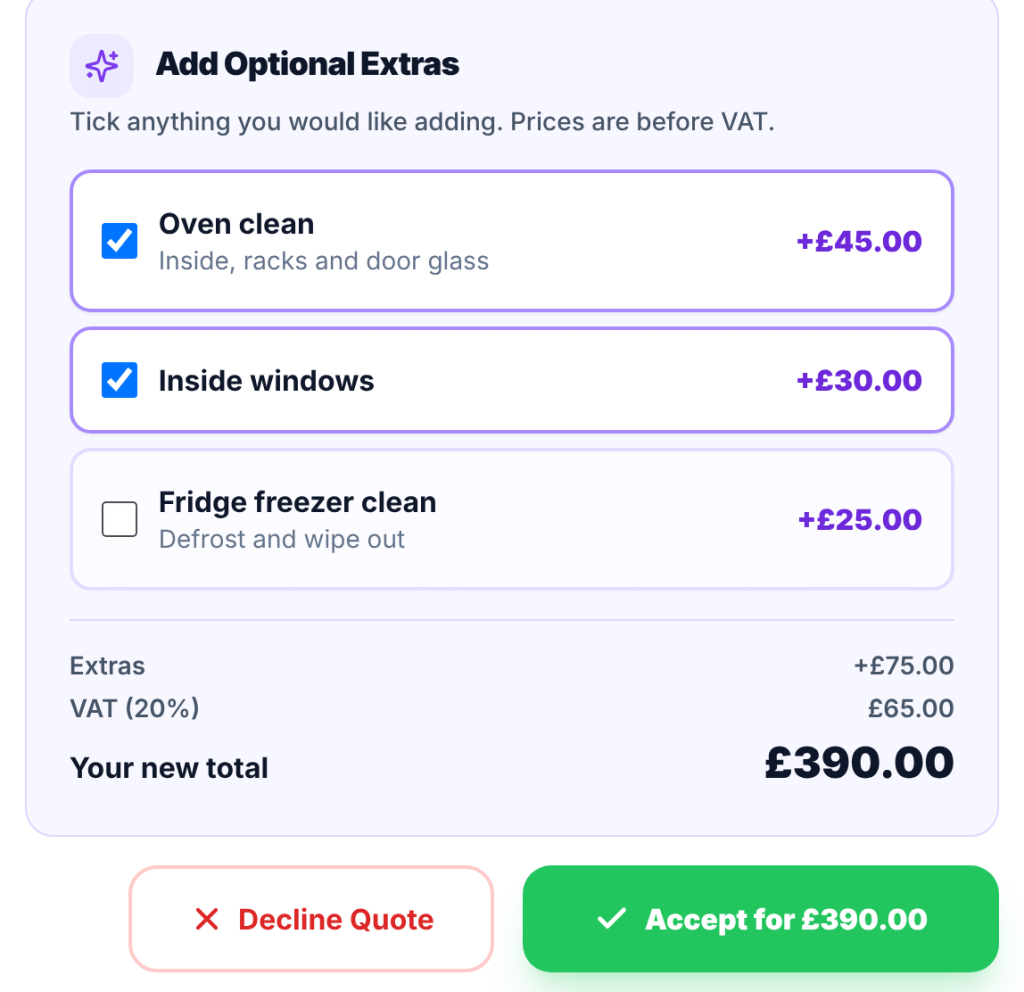
Optional Extras are add-on services you offer on your fixed price quotes, such as a deep oven clean, inside windows, a fridge freezer clean or carpet shampoo. Your customer sees them as tick boxes on their quote and chooses the ones they want when they accept.
Set Up Your Extras Once
Go to Quotes and press Add-ons at the top of the page. Add each extra with:
- a name, for example “Deep oven clean”;
- a short description, for example “Inside, racks and door glass”;
- a price (before VAT);
- any extra time it takes;
- which services it goes with.
Already priced your extras for the ProCleanerUK chatbot? Press Import from Smart Pricing to copy the items from Chatbot Studio across in one go, then add a price to any that don’t have one yet.
Choose What to Offer on Each Quote
When you create a quote with Generate Direct Quote, or send a draft from the Quote Calculator, the matching extras appear under Optional Extras, ready to go. You can:
- untick any you don’t want to offer;
- change a price for that quote only;
- switch extras off completely for that quote.
Your Customer Decides
Your customer sees the extras just above the Accept button, whether they open the quote from their email or in their customer portal. As they tick, the new total with VAT updates in front of them, and the button shows exactly what they’re agreeing to, for example “Accept for £390.00”. Your quote email and PDF also list the extras on offer, so it’s clear from the very first look what the main price covers and what costs more.
Everything Updates for You
When the customer accepts, the extras they chose are added to the job as separate services with their own prices. The total, the VAT and the job length all update automatically. Auto-booked jobs land in your diary with the extras included, upfront payments include them, and you get a notification telling you what they picked.
A Real Example
A customer asks for an end of tenancy clean on a two bed flat. You quote £250 plus VAT for the clean itself, with three extras on offer:
- deep oven clean at £45;
- inside windows at £30;
- fridge freezer clean at £25.
If they tick the oven and the windows: their total goes from £300 to £390 including VAT, and the booking grows by the extra time you set. You’ve earned £75 more, priced properly, with no awkward conversation.
If they don’t tick the oven: it’s on record that they were offered it and chose not to have it. When the landlord’s inventory clerk mentions the oven, there’s no dispute about what you were paid to do, and a good chance of a quick follow-up booking.
Either way, you’re protected.
Clear Quotes Build Trust
Customers don’t mind paying for extras. What they mind is feeling caught out. A quote that clearly shows what’s included, and what each extra costs, comes across as honest and professional. That’s the kind of business people book again and recommend.
Make Every Quote Clearer
If you’re already using ProCleanerUK, head to Quotes, press Add-ons and set up your extras in a couple of minutes. There’s a step-by-step guide with a preview in the Help Centre.
Not using ProCleanerUK yet? Start your 28-day free trial and send quotes that protect your price and your reputation.