Your customers already know what live tracking feels like
Order a curry on Just Eat or a burger on Uber Eats and you watch a little icon move across the map to your door. You know who’s bringing it, how long they’ll be, and you never have to ring the restaurant to ask.
Now think about your cleaning customers. They’ve booked a 9am clean, it’s 9:10, and nobody’s there. So they phone you. Or text your cleaner, who’s driving. Or sit on the sofa wondering if they’ve been forgotten.
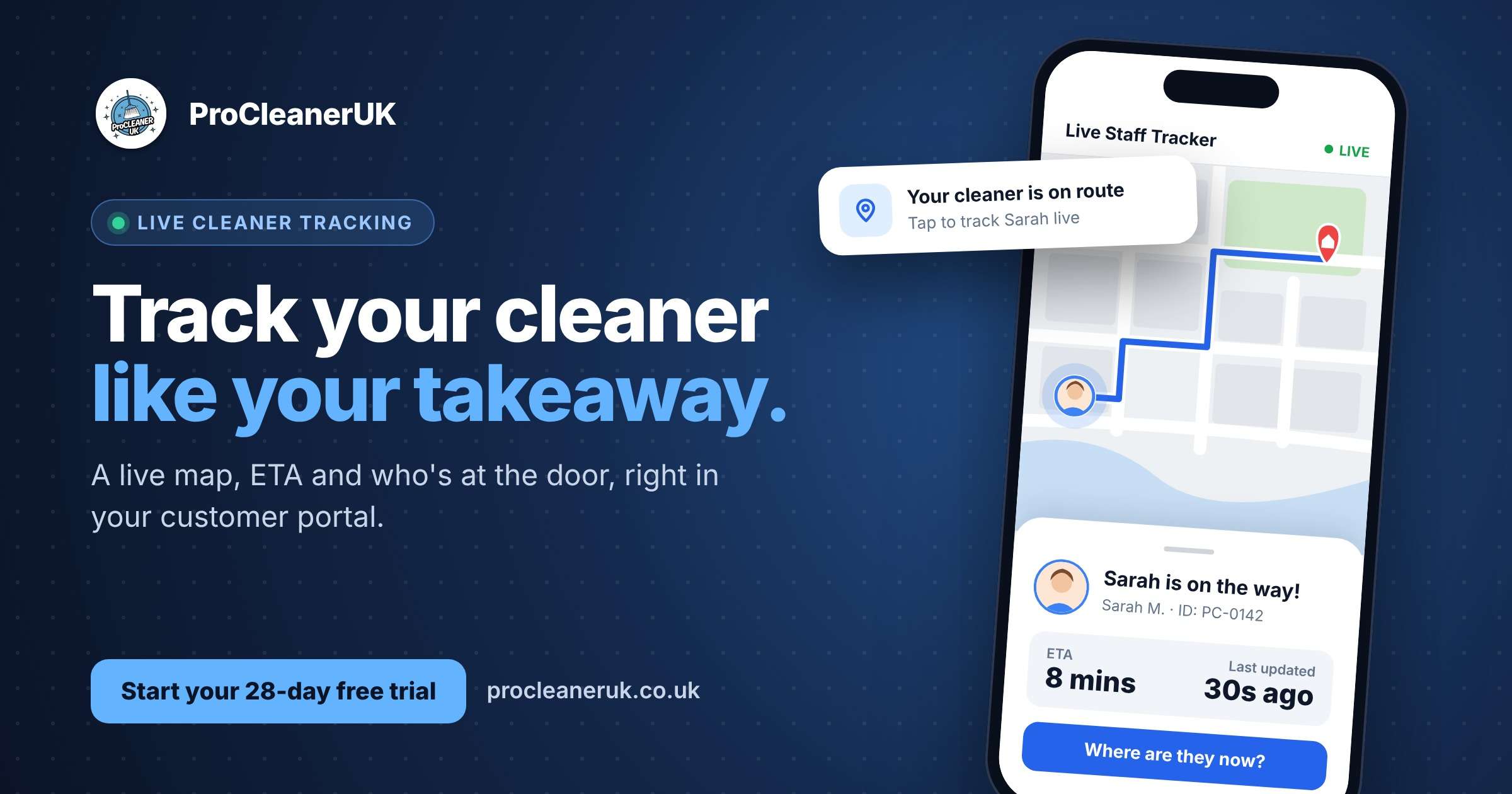
It doesn’t have to be like that. With ProCleanerUK, your customers can track their cleaner live, just like they track their takeaway. They see a map, a photo of who’s coming, the route and an ETA, all from their own customer portal.
What your customer sees
The moment your cleaner sets off, the customer’s job page lights up with a banner: “Sarah is on the way!” If two or more staff are heading over, it says so: “Sarah & James are on the way!”, with both their photos.
Underneath sits the Live Staff Tracker:
- A live map with your cleaner’s profile photo as the pin, the customer’s address as the destination, and the driving route drawn in blue between them.
- An ETA, so the customer knows roughly how long until the doorbell goes.
- “Last updated” with a ticking timer (“updated 30 seconds ago”) and the exact time, so they know the location is fresh.
- A “Where are they now?” button to refresh the position on demand.
Updates arrive in real time. The customer doesn’t need to keep reloading the page; the map moves on its own.
Tracking only appears when it’s relevant: while the cleaner is on route or the job is in progress. Before that, the page simply says tracking will be available once your staff are on the way. Once the job’s done, it disappears.
How it works for your cleaners: one tap
Your staff don’t have to remember to share anything. On the ProCleanerUK staff app, every job card has a Start Journey button.
- Your cleaner taps Start Journey when they leave for the job. The status changes to On Route and tracking switches on.
- Their phone sends its location automatically about once a minute, using the phone’s GPS. The screen is kept awake on the way, so updates keep flowing.
- When they pull up, they tap Finish Route, then Clock In to start the job. Tracking stops as soon as the journey ends.
That’s it. No extra apps, no WhatsApp location pins, no texting while driving.
If you’d rather keep things simpler for some staff, you can hide the journey buttons for them (or company-wide) and they’ll go straight to clocking in.
Built for trust, not just convenience
A delivery driver hands over a bag and leaves. Your cleaner is coming into someone’s home or office. That needs a bit more reassurance, so the tracker comes with:
- Know who’s at the door. The customer sees the name and Employee ID of each assigned cleaner, so they can check it’s the right person before letting them in.
- Running late? One tap. Stuck in traffic, your cleaner taps Running Late? and the customer is notified. Their appointment shows a clear Running Late badge, so nobody’s left guessing.
- Notes for staff. Customers can leave notes on upcoming appointments, like “key is under the mat” or “please use the side gate”, and your team sees them before they arrive.
It’s the same thing Natalie, a ProCleanerUK customer, told us her clients love: staff press start journey, the client knows they’re on the way, and if they’re running late the client hears it straight from them.
Why it matters for your cleaning business
- Fewer “where are they?” calls. Every call you don’t take is time back for quoting, scheduling or, frankly, a cup of tea.
- Your cleaners can concentrate on the road. No more replying to anxious texts mid-journey.
- You look like a much bigger company. Live tracking is what people expect from big brands. Offering it puts a small cleaning firm on the same footing.
- Happier customers, better reviews. Customers who feel informed are far more forgiving of a five-minute delay, and far more likely to leave a good review.
- A selling point at quote stage. “You can track your cleaner live, just like your takeaway” is a line your competitors probably can’t say.
More than a map: the whole customer portal
Live tracking sits inside the ProCleanerUK customer portal, which gives your customers everything in one place:
- Upcoming appointments with clear status badges.
- Reschedule or cancel requests, with a reason, sent straight to you to approve.
- Pay Now buttons for outstanding invoices, paid securely by card.
- Before and after photos from every completed clean.
- Checklist results, so customers can see exactly which tasks were done.
- Star ratings and comments after each job, so you hear about issues early and collect praise when it’s earned.
It all updates live. When your cleaner ticks off a task or uploads a photo, the customer’s page refreshes on its own.
Give your customers the takeaway experience
Your customers already track their dinner. Let them track their cleaner too.
ProCleanerUK gives you live cleaner tracking, a branded customer portal, a staff app with Start Journey and running-late alerts, plus scheduling, quotes, invoicing and payments, all built for UK cleaning businesses.
Start your 28-day free trial and switch on live tracking for your next job. That’s 28 days to see how many “where are they?” calls disappear.
Frequently asked questions
Can my customers track their cleaner live?
Yes. Once your cleaner taps Start Journey in the ProCleanerUK staff app, the customer sees a live map in their portal with the cleaner’s photo, the route and an ETA.
Do customers need to download an app?
No. They log into their ProCleanerUK customer portal and the tracker is on their job page.
How often does the location update?
The staff app sends a fresh location about once a minute while the cleaner is on route. Customers can also tap “Where are they now?” to refresh, and the page shows exactly when the last update came in.
Can customers see where my cleaners are all day?
No. Tracking only shows while a cleaner is on their way to that customer’s job or the job is in progress. Before the journey starts, and after the job ends, there’s nothing to see.
What if two cleaners are going to the same job?
The customer sees both of them: “Sarah & James are on the way!”, with both photos and each person’s name and Employee ID.
What happens if my cleaner is running late?
They tap Running Late? on their job card. The customer is notified and their appointment shows a Running Late badge.
Can I turn the journey buttons off for some staff?
Yes. You can hide them for individual staff or for the whole company, and those staff will clock straight in instead.
How do I try live cleaner tracking?
Start your 28-day free trial, add a customer and a job, and tap Start Journey on the staff app to see it in action.