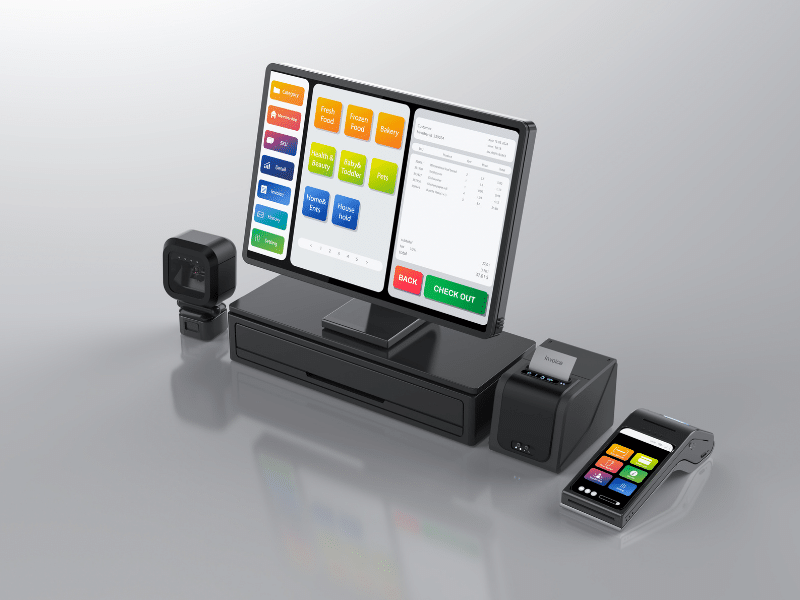
A Till Built for Dry Cleaners
If your cleaning company also runs a dry cleaning or laundry shop, ProCleanerUK now has a till system made specifically for that side of the business.
We built it for independent dry cleaners who were tired of generic till software that doesn’t understand how a dry cleaning counter works. It handles everything from taking an order at the counter to texting the customer when it’s ready, invoicing your hotel and business accounts, and cashing up at the end of the day. It’s now running in dry cleaning shops every day, and we’re making it available to other cleaning businesses.
Fast at the Counter
The till runs on a touch screen and is laid out the way a dry cleaning counter works.
- Tap to build the ticket: pick a category, tap the items, and adjust quantities with plus and minus buttons. Your full price list is loaded in and you can change prices any time.
- Stain and damage tags: select any item on the ticket and tap the tags that apply, so they print on the ticket and nothing is disputed later.
- Find customers instantly: start typing a name and matching customers appear straight away.
- Print and pay in one go: Print & Submit saves the order, prints the receipt and opens the cash drawer. Take cash or card, or put it on account.
- Garment tags with QR codes: print a tag for each item, with an optional QR code that opens the exact order when scanned with a phone, so sorting on a busy day is quick.
- Rush orders, discounts and refunds: add a rush fee, apply a discount or process a refund right from the till.
Every Order Tracked From Counter to Collection
Each order moves through four clear stages: New, Cleaning, Ready and Collected. Your team can see at a glance what needs starting, what’s in progress and what’s waiting on the rail, and marking an order Collected marks it paid if it wasn’t already.
The till also keeps your customers in the loop automatically:
- Ready to collect texts: when an order is marked Ready, the customer gets a text telling them it’s ready.
- Collection reminders: if an order sits on the rail uncollected, a follow-up text goes out on its own.
- Online order tracking: customers can check their order’s status on your website at any time.
- Google review requests: once an order is collected, the customer is sent a text, or an email if there’s no phone number, asking for a quick Google review with a direct link to your listing.
Texts are only sent during sensible hours, so customers aren’t woken up by a message late at night.
Account Customers and Invoicing Built In
Hotels, restaurants, schools and businesses often want to pay on account rather than at the counter, and the till handles that properly.
- Invoice orders: choose Invoice instead of cash or card, set the due date, and the order goes straight into your invoices.
- Monthly consolidated invoices: bill an account customer for all their orders over a period on one invoice.
- Email invoices: send invoices straight to the customer from the till, and mark them paid when the money comes in.
- Customer statements: produce a statement for any customer showing what they’ve had and what they owe.
- Overdue reminders: if an invoice passes its due date unpaid, a reminder goes out automatically and the invoice is highlighted so you can chase it.
Collections in One Place
If you run a collection service, pickup requests from your website land in the till’s Pickups tab, showing the customer, their address, their collection day and round, and how many bags they have. Mark each one collected as your driver brings it in, and filter between pending, collected and all requests, so nothing is missed.
Run the Shop Without Being Behind the Counter
- Staff logins: give each member of staff their own Till Staff login, so tickets and reports show who served each customer. A Till Manager login can handle month-end invoicing without being able to delete anything.
- Cash-up: print an end-of-day cash-up showing takings, refunds and cash paid out of the drawer.
- Daily takings email: the day’s totals are emailed to you automatically, so you don’t need to log in to check.
- Discount and refund alerts: get an email the moment a discount or refund is applied, so nothing happens on the till without you knowing.
- Reports for your accountant: download sales for any date range as a spreadsheet, one row per item, ready for QuickBooks or your accountant.
- Abandoned orders: see anything that’s been sitting uncollected for 30 days or more, so forgotten items don’t get lost on the rail.
- Repeat customer rewards: reward regular customers with a set discount on every Nth order. The till works it out from their order history, so staff simply see it ready to apply.
Your System, Your Data
The till runs on your own WordPress website and keeps everything in your own database: your price list, customers, orders and invoices. Your staff open it on the till computer and it works like any other till.
- Works with standard receipt printers: receipts print through the normal printer driver, which can open the cash drawer automatically.
- Two printers if you need them: run receipts on one printer and garment tags on another.
- Texts through your own SMS account: ready, reminder and review texts are sent through a ClickSend account, so you only pay ClickSend for the messages you send.
- Edit prices whenever you like: add, change or switch off items in your price list, and the till updates straight away.
Get the Till for Your Dry Cleaning Shop
Every shop is set up a little differently, so we price the till around your business: your price list, how many staff and printers you have, and which features you want switched on, from texts and reminders to account invoicing.
Get in touch with the ProCleanerUK team for pricing and to see how it would work in your shop. We’ll talk you through it, answer your questions and give you a clear price with no obligation.